
myPatientVisit Portal
Nextech Systems, LLCMedical
4.839.00 Reviews
- Version
- 6.136.0
- Installs
- 10.00K
- Age Rating
- Everyone
Screenshots
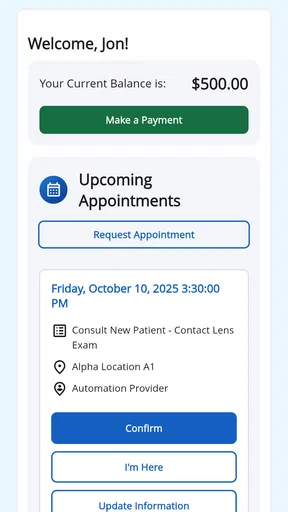
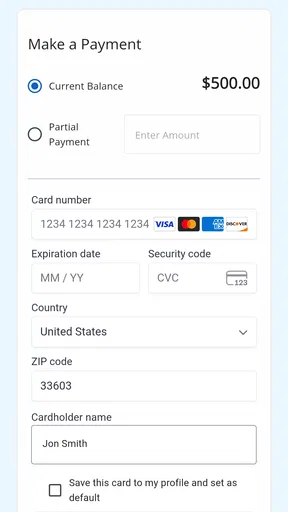
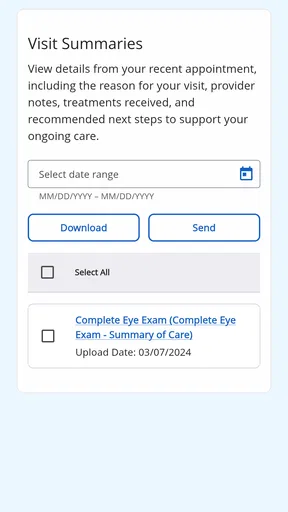
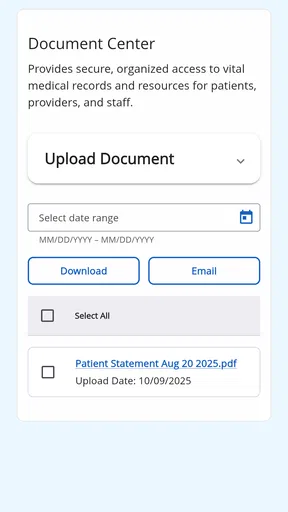
Our Review of myPatientVisit Portal
 Analysis by Appyee
When a medical visit is already part of a busy day, the hardest part is often not the appointment itself but fitting it into everything around it. myPatientVisit Portal is designed for that narrow but useful problem: it gives patients of participating practices a mobile-ready way to handle a visit rather than relying only on a desktop browser or a phone call. I see it as a practical access point, not a replacement for medical advice or a general health-management app.
The app is developed by Nextech Systems, LLC and belongs to the medical category. It is free to use and rated for Everyone, which makes its purpose easy to understand: reduce some of the friction around getting in touch with a healthcare provider through a supported patient system. Its store presence shows a 4.8 average from around 400 ratings, with more than 10 thousand installs, so it has a modest but established user base rather than being an unknown experiment.
What the mobile-ready visit capability changes
The central benefit is convenience. A patient who already uses a participating practice’s myPatientVisit service can move that interaction onto a phone. That matters when an appointment is scheduled during a lunch break, while travelling between errands, or from a room where opening a computer would be inconvenient. The value is less about adding a large collection of health tools and more about making an existing patient connection easier to reach.
That distinction is important. This is not the kind of application I would install expecting symptom analysis, fitness tracking, medication reminders, or an independent doctor network. Its usefulness depends on the healthcare organization and patient workflow behind it. If your practice uses the service, the app can be a straightforward doorway. If it does not, installing it will not create a relationship with a provider by itself.
In my view, the strongest verified capability is the mobile-ready option for patients already using the service. A phone-first route can remove small obstacles that add up: finding a computer, remembering a web address, or postponing a task until there is time to sit down. Those savings may sound minor, but administrative friction is exactly why people delay routine healthcare tasks.
How I would use it before a scheduled appointment
I would begin by checking whether my clinic actually supports myPatientVisit and whether it has directed me to use this particular portal. That is the first practical checkpoint, because the app is tied to a provider’s patient experience rather than functioning as a universal medical account. Once the practice has confirmed the service, I would use the mobile app as the place to continue the workflow the clinic has set up.
A useful habit is to prepare the phone before the appointment rather than opening the app for the first time at the exact start time. I would make sure the device is charged, the operating system meets the app’s requirement, and I know which patient credentials or instructions the practice provided. This is not a glamorous tip, but it prevents the common mistake of treating a digital appointment tool like an on-demand emergency service.
The current version is 6.136.0, and the minimum operating-system requirement is version 10. That requirement is worth checking on an older phone before relying on the app for an important visit. A compatible device does not guarantee that every clinic workflow will feel identical, because the provider’s setup remains part of the experience, but it does remove one avoidable source of trouble.
I also recommend keeping the app’s role clear during a consultation. A portal can help connect a patient with a practice, yet it should not be treated as a substitute for urgent care or emergency services. If a health problem is severe or time-sensitive, I would use the appropriate emergency channel instead of waiting for a portal interaction. For ordinary scheduled care, however, having the visit route available on a phone is genuinely more convenient than being tied to a desktop.
A realistic day-to-day example
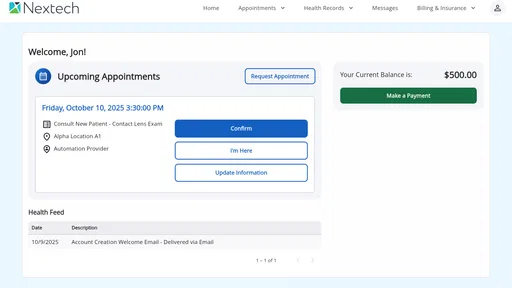
Imagine that I have a routine appointment on a workday and discover that my schedule has changed. With a conventional arrangement, I might need to leave my desk, search for the practice’s website, remember how to reach the patient area, and then deal with the appointment from a browser. With the mobile-ready option, I can start from the app and handle the patient-facing part from the device already in my hand.
The practical advantage is not that the medical conversation becomes shorter or that the app makes a diagnosis. The advantage is continuity. I do not have to switch from a mobile context to a separate computer-based process simply because the appointment belongs to a healthcare system. For people who work away from home, share a computer, or rarely use desktop websites, that change can make participation feel more manageable.
There is also a useful preparation trade-off here. A larger computer screen may still be preferable for reading lengthy information or managing several items at once. A phone is better for immediacy and portability. I would choose the app when being mobile matters most, but I would not assume that smaller-screen convenience is automatically better for every patient or every appointment.
Where the app is most useful
The best scenario is a patient who already belongs to a participating practice and wants a simpler way to reach the practice’s digital visit process from a phone. This could be someone with a regular appointment, a patient who spends much of the day away from a desk, or a family member helping another person navigate a scheduled interaction.
For that last case, I would be careful about privacy and control. Helping someone open a portal on a phone is different from taking over their healthcare account. The patient should remain aware of what is being accessed and submitted. The app can make the technical side easier, but it does not remove the need for the patient and caregiver to agree on how the account is used.
It can also suit people who find traditional websites intimidating. A dedicated app gives the task a visible place on the phone instead of making the user remember which browser page leads to the correct portal. That does not make the medical system itself simple, but it can make the first step less confusing. For a patient who postpones digital healthcare because it feels scattered, this focused entry point has real value.
I would be less enthusiastic for someone who wants one application to combine records from many unrelated providers. The narrow design is a strength when the practice supports it, but it is also a boundary. If your healthcare is spread across organizations that use different systems, a broader health-record solution may be more convenient for viewing everything in one place, assuming those providers support it.
The trade-offs I noticed
The biggest trade-off is dependence on the participating practice. The app cannot solve a provider-side problem, replace a clinic’s instructions, or guarantee that every patient interaction will be available in the same way. Before counting on it, I would confirm that my own practice uses myPatientVisit and ask what the app is intended to handle. That quick check is more useful than assuming the name alone tells me the complete workflow.
Another limitation is that mobile convenience can create false confidence. Because the app is easy to open, a patient may expect immediate answers or a full medical service at any hour. I would treat it as a channel for the practice’s supported process, not as a live substitute for a clinician whenever a question occurs. The distinction protects both expectations and safety.
There is also the ordinary friction of using a phone for healthcare. Small text, a weak connection, low battery, or an older device can turn a simple task into a stressful one. I would keep a backup plan for an important appointment, such as knowing how to contact the practice through its normal channels. That is not a criticism unique to this app; it is the sensible compromise whenever a medical visit depends on a personal device.
Privacy is another reason to use the app thoughtfully. A shared or borrowed phone may expose a patient portal more easily than a private computer. I would avoid leaving an account open for someone else, use the device’s normal security protections, and be deliberate when assisting a family member. The app’s convenience should not lead to careless handling of personal health information.
Compared with a normal browser-based portal, the app’s likely appeal is speed of access and a more natural fit for mobile use. Compared with calling the practice, it may reduce waiting and make the process available without staying on the phone. But calling remains better when the situation is unusual, urgent, or difficult to explain through a digital workflow. Compared with broad health apps, this one is more focused on the relationship with a supported practice and less suited to collecting unrelated health information.
Small workflow choices that make a difference
My first tip is to verify the practice connection before doing anything else. Search results and app names can be confusing, especially when a clinic has its own instructions. I would follow the healthcare provider’s directions and make sure the account details belong to the intended patient. This avoids wasting time inside an app that is not connected to the practice I need.
My second tip is to prepare questions separately before opening the visit. A mobile portal can make access easier, but it does not organize my thoughts for me. I would write down symptoms, medication questions, changes since the last appointment, and the decision I hope to make. That turns the app from merely a doorway into part of a more effective appointment routine.
My third tip is to distinguish technical preparation from clinical preparation. Checking the device, connection, and account access helps the visit start smoothly; it does not replace bringing relevant health information or following the clinician’s instructions. Keeping those two jobs separate makes it easier to identify whether a problem is with the app, the provider workflow, or the medical question itself.
A fourth useful choice is to avoid testing the service for the first time during a high-pressure appointment. If the practice gives setup instructions, I would review them in advance and contact the practice through its normal support route if something does not work. The app can simplify access, but the clinic remains the right place to clarify provider-specific requirements.
Who should choose it, and who should skip it
I would recommend myPatientVisit Portal to patients whose healthcare provider already uses the service and who prefer handling scheduled patient interactions from a phone. It is especially sensible for people who are frequently away from a computer, want a dedicated mobile entry point, or find browser-based portals easy to lose track of.
I would also consider it for a trusted caregiver assisting with a patient’s routine digital visit, provided the patient’s privacy and consent are respected. The mobile format can make the practical side of assistance less awkward, although it does not eliminate the need to communicate clearly with the practice.
I would skip it if my provider does not support myPatientVisit, if I need a single dashboard for several unrelated healthcare systems, or if my main goal is health tracking rather than provider access. I would also avoid relying on it as the only option for urgent medical concerns. In those situations, a phone call, emergency service, or a broader record-management tool may be the better choice.
The app is free, which removes a financial barrier to trying it when a practice recommends it. Its Everyone age rating also reflects a broadly accessible patient-facing purpose, though younger users may still need a parent or guardian’s involvement depending on their healthcare arrangement. The important question is not whether the download costs anything; it is whether the clinic relationship behind it makes the app useful.
My final assessment after looking at its real role
The real strength of myPatientVisit Portal is not breadth; it is reducing the distance between a patient and a participating practice. That focused job makes sense on a phone. When I need a supported mobile route for a scheduled healthcare interaction, the app feels more practical than repeatedly searching for a portal in a browser or waiting on a phone line.
At the same time, I would not describe it as a complete medical companion. Its usefulness is conditional on provider support, and a phone-based visit still depends on preparation, a suitable device, and a sensible backup plan. Those limits are important, but they do not cancel out the convenience for the right audience.
Overall, I see this free medical app as a good fit for existing myPatientVisit patients who want a simpler mobile experience. Nextech Systems, LLC has kept the purpose focused rather than trying to turn it into an unrelated health super-app. If your practice points you toward it, I would try it, prepare the device before an appointment, and keep expectations realistic. If you are looking for broad health tracking or access to providers outside that supported system, I would choose a different kind of app instead.
Verdict
Strengths of myPatientVisit Portal
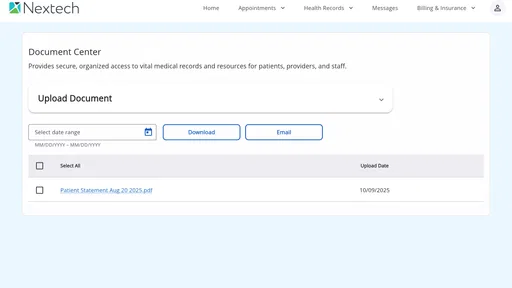
- Secure access to personal health records and visit information.
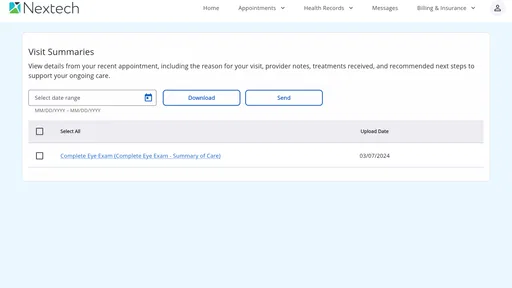
- Makes appointment details and medical instructions easy to review.
- Can reduce phone calls for routine portal-related requests.
- Useful for keeping healthcare information organized in one place.
- Supports more convenient communication with participating providers.
Limitations of myPatientVisit Portal
- Features depend heavily on whether your healthcare provider supports the portal.
- Some users may need help completing registration or account verification.
- Not intended for urgent medical issues or emergency communication.
- Login problems can be disruptive when information is needed quickly.
- Available tools and records may vary between clinics and healthcare systems.
Similar Picks in This Category
View All
WebMD: Symptom Checker
WebMD, LLC4.1

Microphone Amplifier
DOSA Apps4.2

Anatomy Learning - 3D Anatomy
3D Medical OU4.5

Period Tracker and Calendar
SimpleInnovation4.9

GoodRx: Prescription Coupons
GoodRx4.8

CVS Health
CVS Pharmacy4.5
Frequently Asked Questions
What is myPatientVisit Portal used for?
myPatientVisit Portal is designed to give patients convenient online access to healthcare-related services and information. Depending on the participating hospital or clinic, you may be able to check appointment details, review messages, complete forms, view selected medical information, or communicate with the care team. The exact features can vary by provider, so the app’s availability and functions depend on your healthcare organization.
How do I sign in to myPatientVisit Portal?
To use myPatientVisit Portal, you generally need an account provided by a participating healthcare organization. Sign-in may require an invitation, activation code, username, password, or another verification method. If you cannot access your account, use the available password-recovery option or contact the hospital or clinic directly. The app itself may not be able to resolve registration problems for every provider.
Is myPatientVisit Portal secure and private?
The portal is intended to provide a secure way to access personal healthcare information, but users should still take normal precautions. Use a strong, private password, avoid signing in on shared devices, and enable device security such as a passcode or biometric lock. Always log out when appropriate, keep the app updated, and contact your healthcare provider if you notice unfamiliar activity or an unexpected message.
Can I use the portal for emergencies or urgent medical advice?
No, myPatientVisit Portal should not be treated as an emergency service. Messages and requests may not be reviewed immediately, and response times can vary by healthcare organization. If you are experiencing a life-threatening emergency, contact local emergency services or go to the nearest emergency department. For urgent but non-emergency concerns, follow the instructions provided by your doctor or clinic.
Why are some features or medical records unavailable in myPatientVisit Portal?
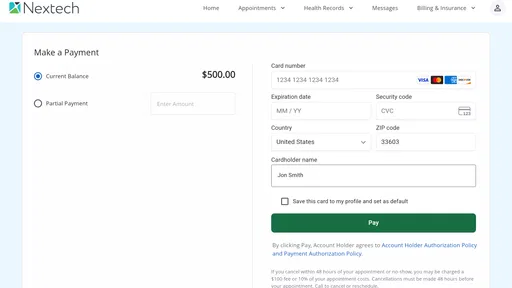
The information displayed in myPatientVisit Portal depends on the healthcare organization connected to your account and the features it has enabled. Some records, test results, appointments, billing details, or messaging tools may not be available through the app. Information can also take time to appear after a visit. If something seems missing or incorrect, contact the relevant clinic or hospital for clarification.
